Windows / macOS / Linux / Cloud Browser

Your AI can answer. Noxgild lets it do the work.

Files and terminal are only the baseline. Connect ChatGPT, Claude, Cursor, Codex, and other supported AI tools to an authorized computer with persistent processes, signed-in browser sessions, native desktop apps, and a separate Cloud Browser when you need one.

70 capabilities
Machine · Browser · Apps
Windows · Mac · Linux
Cloud Browser
Human approvals

Built on infrastructure you can trust

Google Cloud
Vercel
Supabase
PostHog
Stripe
Resend
GitHub
npm
Google Cloud
Vercel
Supabase
PostHog
Stripe
Resend
GitHub
npm
Google Cloud
Vercel
Supabase
PostHog
Stripe
Resend
GitHub
npm
Google Cloud
Vercel
Supabase
PostHog
Stripe
Resend
GitHub
npm
Start where you already work

Connect Noxgild to Claude or Codex in minutes.

Use the guided setup today. When the directory listings are published, these same cards can become direct one-click connections.

Claude logo

Custom connector available now

Claude

Connect Claude to an authorized computer and work with the real files, terminal, browser sessions, and desktop apps around your project.

  • Works from Claude web, desktop, and mobile
  • Choose the computer Claude can reach
  • Community directory listing is in preparation
Set up Claude
Codex logo

Remote MCP available now

Codex

Give Codex the same Noxgild environment so it can move beyond its current workspace into your other authorized computers and tools.

  • Remote MCP with OAuth
  • Machine, Browser, and Desktop surfaces
  • Reuse the same authorized Noxgild computers
Set up Codex
One execution layer

Keep the AI you already use. Give it a real environment.

Supported clients converge on one authorized Noxgild layer, then reach the computer or browser surface the task actually needs.

Any compatible AI client
Noxgild

Noxgild

Authorized execution layer

OAuthApprovalsExact device

Machine

Files, shell, processes

Browser

Signed-in local browser

Desktop

Native GUI applications

Cloud Browser

Isolated hosted browser

Vibe coding + real execution

Build there. Finish the job in the real environment.

Hosted builders are great at generating and previewing. Noxgild gives the workflow a controlled path into the computers, private networks, browsers, desktop apps, and infrastructure your project actually depends on.

Builders

Lovable logoLovable
v0 logov0
Bolt logoBolt
Replit logoReplit
Base44 logoBase44
Stitch logoStitch
Noxgild

Noxgild

Real-world execution

OAuthApprovals

Execution

Local machine

Private network

Browser

Desktop apps

Infrastructure

Docker / K8s / cloud CLI

Build in the vibe tool. Finish in the environment that matters.

Compatibility claims stay conservative: direct integrations are labeled live only after they are verified.

See live integrations
How it works

From first connection to first completed task in three steps.

You do not need to learn an automation framework. Connect the environment, connect the AI, and ask for the work you actually need done.

01

Connect a computer

Run one command on Windows, macOS, or Linux and approve the computer from your Noxgild account.

npx @noxgild/cli@latest connect
02

Connect the AI you already use

Choose ChatGPT, Claude, Cursor, Codex, Copilot, Gemini CLI, or another supported client.

Reuse the same authorized computer across clients.
03

Ask for the outcome

Noxgild gives the AI controlled access to the real files, terminal, browser, desktop, and verification steps needed to finish the job.

You stay in control of approvals and protected human checks.
Real product. Real environment.

See the execution layer before you connect anything.

These are live Noxgild product surfaces—not template dashboards. The account tells you what is connected, what is ready, and where the work will run.

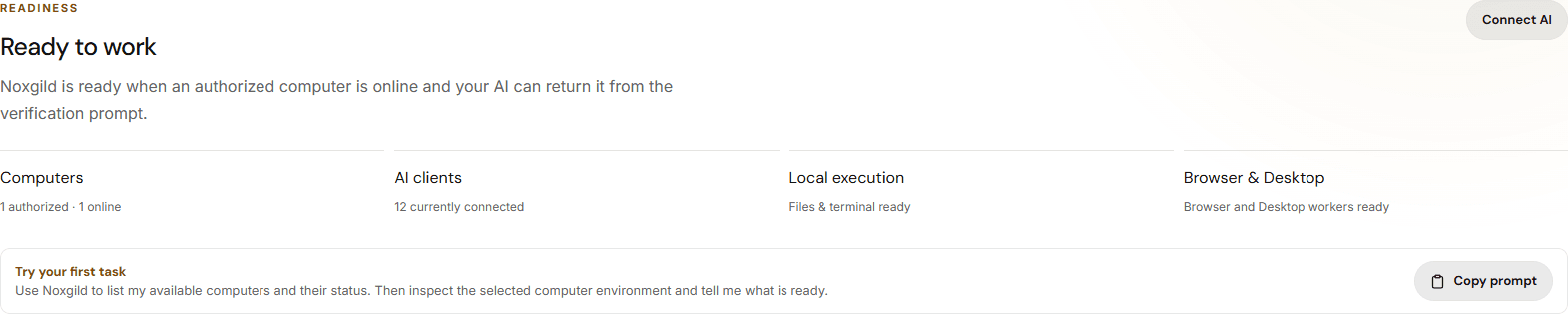
Control Center

See when the environment is actually ready

Noxgild shows authorized computers, connected AI clients, and worker readiness instead of making the AI guess.

Captured from the live Noxgild app
See when the environment is actually ready

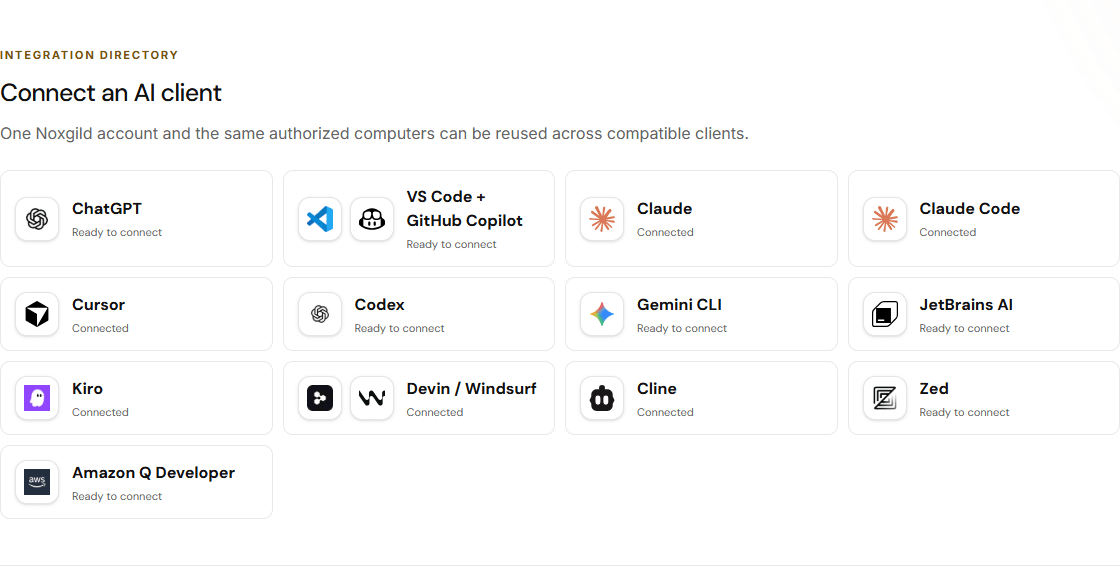
Connect AI

Reuse one computer across supported AI clients

Connect the tools your team already uses to the same authorized Noxgild environment.

Captured from the live Noxgild app
Reuse one computer across supported AI clients

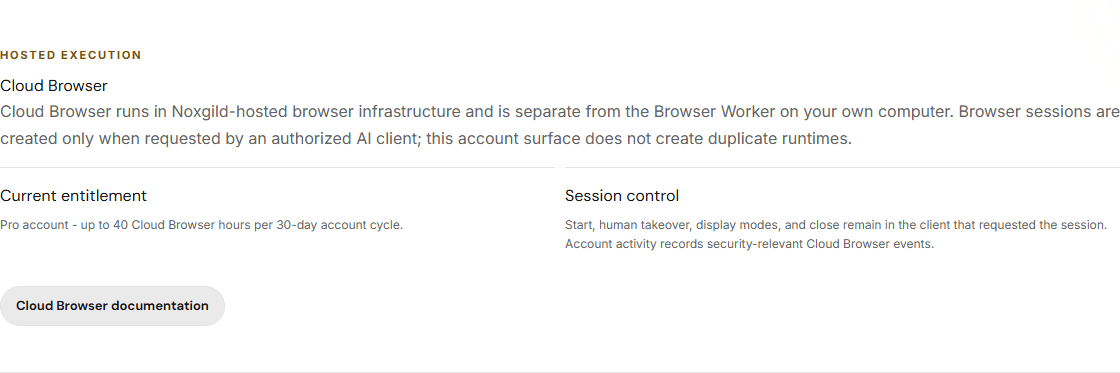
Cloud Browser

Keep hosted browser work separate from your own computer

Cloud Browser is a distinct hosted runtime with its own entitlement and control model.

Captured from the live Noxgild app
Keep hosted browser work separate from your own computer
Two execution environments

Your computer when context matters. Cloud Browser when isolation matters.

YOUR COMPUTER

Use the environment where the real work already lives

Best when the workflow depends on your existing files, repo, terminal, signed-in browser session, native desktop apps, VPN, or local credentials.

  • Windows, macOS, and Linux
  • Files and persistent terminal processes
  • Signed-in local browser
  • Supported desktop applications
Connect a computer

CLOUD BROWSER

Use a separate hosted browser when local is not the right runtime

Best when you want a bounded hosted browser session that is isolated from your workstation but still observable and controllable.

  • Hosted browser session
  • Live viewer
  • Human takeover
  • 40 hours per 30-day cycle on Pro
Explore Cloud Browser
Platform

One controlled execution layer across the surfaces real work needs.

Noxgild connects the AI tools you already use to authorized computers and browsers without pretending the work happened somewhere else.

Your computer
ONLINE
Files & terminal01
Signed-in browser02
Desktop apps03
Your computer
Work where the real environment already lives

Authorize a Windows, macOS, or Linux computer once, then let compatible AI clients work across its files, terminal, signed-in browser, and supported desktop apps.

Cloud Browser
READY
Isolated runtime01
Human takeover02
Bounded lifecycle03
Cloud Browser
Use an isolated hosted browser when local is not the right runtime

Start a bounded hosted browser session with a live viewer, explicit human takeover, and clean session lifecycle.

Durable control
VERIFIED
Durable command state01
Risk-based approvals02
Result verification03
Durable control
Verify what happened before anything gets replayed

Noxgild preserves authoritative command state, approvals, and result evidence so reconnects or timeouts do not turn into blind retries.

Who uses Noxgild

Built for work that does not stop at the answer.

If your job crosses files, terminals, signed-in browsers, cloud consoles, native apps, or remote systems, Noxgild gives the AI you already use a controlled way to work in that real environment.

Explore use cases
DevOps
Operate the systems around the deployment

Run deployment tooling, inspect local configuration, use authenticated cloud consoles, watch logs, and verify the final state from one controlled execution layer.

IT support & help desk
Troubleshoot where the user actually works

Inspect the authorized computer, browser session, files, settings, and supported desktop apps together instead of diagnosing from screenshots and copied error messages.

Platform engineering & SRE
Keep long-running operational work attached to the real environment

Work across terminals, services, logs, browsers, dashboards, and native tools without losing machine state between AI turns.

QA & release engineering
Reproduce and verify on the actual test environment

Use the real test computer, signed-in browser, terminal, and desktop app together to reproduce defects and confirm that the fix actually worked.

DevOps
Operate the systems around the deployment

Run deployment tooling, inspect local configuration, use authenticated cloud consoles, watch logs, and verify the final state from one controlled execution layer.

IT support & help desk
Troubleshoot where the user actually works

Inspect the authorized computer, browser session, files, settings, and supported desktop apps together instead of diagnosing from screenshots and copied error messages.

Platform engineering & SRE
Keep long-running operational work attached to the real environment

Work across terminals, services, logs, browsers, dashboards, and native tools without losing machine state between AI turns.

QA & release engineering
Reproduce and verify on the actual test environment

Use the real test computer, signed-in browser, terminal, and desktop app together to reproduce defects and confirm that the fix actually worked.

DevOps
Operate the systems around the deployment

Run deployment tooling, inspect local configuration, use authenticated cloud consoles, watch logs, and verify the final state from one controlled execution layer.

IT support & help desk
Troubleshoot where the user actually works

Inspect the authorized computer, browser session, files, settings, and supported desktop apps together instead of diagnosing from screenshots and copied error messages.

Platform engineering & SRE
Keep long-running operational work attached to the real environment

Work across terminals, services, logs, browsers, dashboards, and native tools without losing machine state between AI turns.

QA & release engineering
Reproduce and verify on the actual test environment

Use the real test computer, signed-in browser, terminal, and desktop app together to reproduce defects and confirm that the fix actually worked.

DevOps
Operate the systems around the deployment

Run deployment tooling, inspect local configuration, use authenticated cloud consoles, watch logs, and verify the final state from one controlled execution layer.

IT support & help desk
Troubleshoot where the user actually works

Inspect the authorized computer, browser session, files, settings, and supported desktop apps together instead of diagnosing from screenshots and copied error messages.

Platform engineering & SRE
Keep long-running operational work attached to the real environment

Work across terminals, services, logs, browsers, dashboards, and native tools without losing machine state between AI turns.

QA & release engineering
Reproduce and verify on the actual test environment

Use the real test computer, signed-in browser, terminal, and desktop app together to reproduce defects and confirm that the fix actually worked.

Software developers
Go beyond the codebase

Let supported AI clients inspect the repo, run tests, edit files, operate local tooling, use the browser, and verify the result on the same authorized machine.

Founders & agencies
Finish multi-step operational work

Move from planning to execution across project files, admin dashboards, browser workflows, customer systems, and native software without copying every artifact back into chat.

AI automation builders
Reuse the same computer across AI clients

Connect the environment once, then let compatible AI tools target the same authorized computer instead of rebuilding machine integrations for every assistant.

Security-conscious teams
Keep control at the risky edges

Preserve approvals, human verification, durable command state, scoped access, and revocation while routine work can complete without constant permission fatigue.

Software developers
Go beyond the codebase

Let supported AI clients inspect the repo, run tests, edit files, operate local tooling, use the browser, and verify the result on the same authorized machine.

Founders & agencies
Finish multi-step operational work

Move from planning to execution across project files, admin dashboards, browser workflows, customer systems, and native software without copying every artifact back into chat.

AI automation builders
Reuse the same computer across AI clients

Connect the environment once, then let compatible AI tools target the same authorized computer instead of rebuilding machine integrations for every assistant.

Security-conscious teams
Keep control at the risky edges

Preserve approvals, human verification, durable command state, scoped access, and revocation while routine work can complete without constant permission fatigue.

Software developers
Go beyond the codebase

Let supported AI clients inspect the repo, run tests, edit files, operate local tooling, use the browser, and verify the result on the same authorized machine.

Founders & agencies
Finish multi-step operational work

Move from planning to execution across project files, admin dashboards, browser workflows, customer systems, and native software without copying every artifact back into chat.

AI automation builders
Reuse the same computer across AI clients

Connect the environment once, then let compatible AI tools target the same authorized computer instead of rebuilding machine integrations for every assistant.

Security-conscious teams
Keep control at the risky edges

Preserve approvals, human verification, durable command state, scoped access, and revocation while routine work can complete without constant permission fatigue.

Software developers
Go beyond the codebase

Let supported AI clients inspect the repo, run tests, edit files, operate local tooling, use the browser, and verify the result on the same authorized machine.

Founders & agencies
Finish multi-step operational work

Move from planning to execution across project files, admin dashboards, browser workflows, customer systems, and native software without copying every artifact back into chat.

AI automation builders
Reuse the same computer across AI clients

Connect the environment once, then let compatible AI tools target the same authorized computer instead of rebuilding machine integrations for every assistant.

Security-conscious teams
Keep control at the risky edges

Preserve approvals, human verification, durable command state, scoped access, and revocation while routine work can complete without constant permission fatigue.

Workflow stories

What changes when the AI can reach the real environment.

Marcus

“Noxgild has completely changed how I work. I can automate tasks on my computer and in the browser with simple prompts. It just works.”

Sarah

“I use Noxgild every day to handle repetitive work across multiple apps. It saves me hours and lets me focus on the important stuff.”

Daniel

“The cloud computer feature is a game changer. I can access my tools and files from anywhere and get things done securely and quickly.”

Emily

“Noxgild is super easy to set up and the security controls give me peace of mind. It’s like having a trustworthy assistant for my computer.”

Marcus

“Noxgild has completely changed how I work. I can automate tasks on my computer and in the browser with simple prompts. It just works.”

Sarah

“I use Noxgild every day to handle repetitive work across multiple apps. It saves me hours and lets me focus on the important stuff.”

Daniel

“The cloud computer feature is a game changer. I can access my tools and files from anywhere and get things done securely and quickly.”

Emily

“Noxgild is super easy to set up and the security controls give me peace of mind. It’s like having a trustworthy assistant for my computer.”

Marcus

“Noxgild has completely changed how I work. I can automate tasks on my computer and in the browser with simple prompts. It just works.”

Sarah

“I use Noxgild every day to handle repetitive work across multiple apps. It saves me hours and lets me focus on the important stuff.”

Daniel

“The cloud computer feature is a game changer. I can access my tools and files from anywhere and get things done securely and quickly.”

Emily

“Noxgild is super easy to set up and the security controls give me peace of mind. It’s like having a trustworthy assistant for my computer.”

Marcus

“Noxgild has completely changed how I work. I can automate tasks on my computer and in the browser with simple prompts. It just works.”

Sarah

“I use Noxgild every day to handle repetitive work across multiple apps. It saves me hours and lets me focus on the important stuff.”

Daniel

“The cloud computer feature is a game changer. I can access my tools and files from anywhere and get things done securely and quickly.”

Emily

“Noxgild is super easy to set up and the security controls give me peace of mind. It’s like having a trustworthy assistant for my computer.”

Jason

“I run a small business and Noxgild helps me automate a ton of routine work. It’s reliable, fast, and has already paid for itself many times over.”

Rachel

“The browser automation with Noxgild is incredible. I can research, collect data, and update systems without lifting a finger. Highly recommend!”

Arjun

“Noxgild makes advanced automation simple. The MCP integration and app support are powerful, and the interface is clean and easy to use.”

Nicole

“I love how flexible Noxgild is. I can control my computer, manage files, and automate web tasks all in one place. It’s a must-have for anyone who wants to be more productive.”

Jason

“I run a small business and Noxgild helps me automate a ton of routine work. It’s reliable, fast, and has already paid for itself many times over.”

Rachel

“The browser automation with Noxgild is incredible. I can research, collect data, and update systems without lifting a finger. Highly recommend!”

Arjun

“Noxgild makes advanced automation simple. The MCP integration and app support are powerful, and the interface is clean and easy to use.”

Nicole

“I love how flexible Noxgild is. I can control my computer, manage files, and automate web tasks all in one place. It’s a must-have for anyone who wants to be more productive.”

Jason

“I run a small business and Noxgild helps me automate a ton of routine work. It’s reliable, fast, and has already paid for itself many times over.”

Rachel

“The browser automation with Noxgild is incredible. I can research, collect data, and update systems without lifting a finger. Highly recommend!”

Arjun

“Noxgild makes advanced automation simple. The MCP integration and app support are powerful, and the interface is clean and easy to use.”

Nicole

“I love how flexible Noxgild is. I can control my computer, manage files, and automate web tasks all in one place. It’s a must-have for anyone who wants to be more productive.”

Jason

“I run a small business and Noxgild helps me automate a ton of routine work. It’s reliable, fast, and has already paid for itself many times over.”

Rachel

“The browser automation with Noxgild is incredible. I can research, collect data, and update systems without lifting a finger. Highly recommend!”

Arjun

“Noxgild makes advanced automation simple. The MCP integration and app support are powerful, and the interface is clean and easy to use.”

Nicole

“I love how flexible Noxgild is. I can control my computer, manage files, and automate web tasks all in one place. It’s a must-have for anyone who wants to be more productive.”

Control and security

Computer access should be powerful without becoming invisible.

Noxgild keeps the computer owner in the loop at the places where automation should stop, ask, verify, or be revoked.

Authorized computers only

A computer has to be explicitly connected to your account before an AI client can target it.

Risk-based approvals

Higher-impact actions can stop for exact approval instead of receiving blanket permission.

Human verification stays human

CAPTCHA, OTP, passkeys, secure prompts, and similar protected checks are not bypassed.

No blind retries

Durable command state and UNKNOWN outcomes help clients verify the real world before repeating side effects.

Revocable access

Pause or revoke computers, disconnect clients, and rotate credentials from the account control center.

Start free. Upgrade only when you need more.

Free includes 10,000 normal tool calls per 30-day account cycle. Pro is $20/month with high-volume normal usage plus 40 Cloud Browser hours.


Free

For getting started with Noxgild on your own authorized computer.

$0
No payment method required
Get started

A 30-day usage cycle is anchored to the account creation time.


  • 10,000 Noxgild tool calls per 30-day account cycle
  • Computer management from your Noxgild account
  • Machine, Browser, and Desktop capability access
  • ChatGPT connection through the Noxgild plugin

Pro

For higher-volume Noxgild use and hosted Cloud Browser access.

$20
/month
Monthly · cancel at period end
Available now
Upgrade to Pro

No trial, annual commitment, or automatic conversion from Free.


  • High-volume normal tool usage subject to fair use and abuse prevention
  • 40 Cloud Browser hours per 30-day account cycle
  • Self-service billing and period-end cancellation
  • No automatic conversion from Free

Questions before you give an AI real computer access.

Ready to let your AI finish the job?

Keep the AI tools you already know. Add the execution layer that can actually work on authorized computers and browsers.